25 Ultimate Gemini Prompt is an essential guide covering everything you need to know about this topic.
Mini prompt shortcuts are reusable instructions that turn common requests—writing, research, coding, studying, and planning—into one-step commands. By typing a shortcut such as /Summarizer or /CodeHelper, you can avoid repeating detailed prompts and get more consistent results. Gemini supports custom, repeatable instructions through features such as Gems and Skills, which are designed to save frequently used prompts for reuse.
Gemini Prompt Shortcuts
What Are Gemini Prompt Shortcuts?
A prompt shortcut is a saved command that tells Gemini how to respond. Instead of writing, “Explain this topic simply, use examples, and keep it under 300 words,” you can use “Simple.” Explain and add only your topic.
These shortcuts are useful because they:
- Save time on repeated tasks.
- Produce a more consistent writing or analysis style.
- Help beginners use AI without learning advanced prompt engineering.
- Make Gemini useful for students, creators, marketers, developers, and professionals.
Google describes prompts as natural-language instructions, and its Gemini tools allow users to save custom instructions and reuse them for similar tasks.
Gemini Prompt Shortcuts
25 Useful Gemini Prompt Shortcuts
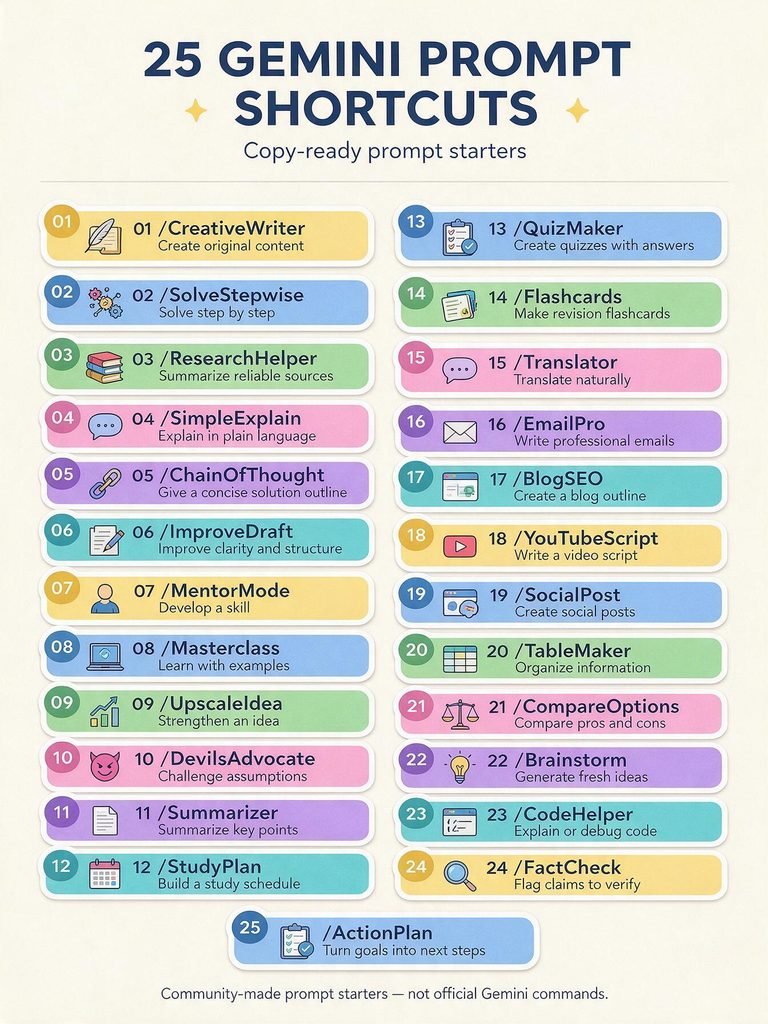
| Shortcut | Best Use | Example |
| /CreativeWriter | Original stories, captions, and creative content | “/CreativeWriter Write a short sci-fi story about a city where memories are traded.” |
| /SolveStepwise | Maths, logic, and technical problems | “/SolveStepwise: Solve this equation and explain each step.” |
| /ResearchHelper | Reliable research summaries | “/ResearchHelper Summarise recent trends in renewable energy.” |
| /SimpleExplain | Easy explanations for beginners | “/SimpleExplain What is Blockchain?” |
| /ChainOfThought | Concise solution outlines | “/ChainOfThought Outline how to launch an online store.” |
| /ImproveDraft | Editing and restructuring text | “ImproveDraft: Make this email clearer and more professional.” |
| /MentorMode | Skill-building guidance | “/MentorMode: Help me improve my public speaking.” |
| /Masterclass | Detailed learning with examples | “Masterclass: Teach me the basics of digital marketing.” |
| /UpscaleIdea | Improving raw ideas | “Upscale Idea: Improve my idea for an eco-friendly packaging startup.” |
| /DevilsAdvocate | Finding weaknesses in a plan | “/DevilsAdvocate challenges my business plan and identifies risks.” |
| /Summarizer | Condensing long content | “/Summarizer: Summarise this article in five bullet points.” |
| /StudyPlan | Structured learning schedules | “/StudyPlan Create a 30-day plan to learn Python.” |
| /QuizMaker | Practice questions | “/QuizMaker Create 10 MCQs on world history with answers.” |
| /Flashcards | Revision material | “/Flashcards: Make flashcards for biology chapter 3.” |
| /Translator | Natural translation | “Translate this message into natural Spanish.” |
| /EmailPro | Professional emails | “/EmailPro Write a polite follow-up email to a client.” |
| /BlogSEO | SEO-friendly blog outlines | “/BlogSEO Create an outline for ‘best budget laptops’.” |
| /YouTubeScript | Video scripts | “/YouTubeScript Write a 5-minute script about AI tools.” |
| /SocialPost | Social media content | “/Social Post: Create three Instagram captions for a coffee brand.” |
| /TableMaker | Organising information | “/TableMaker Compare iPhone and Android in a table.” |
| /CompareOptions | Pros and cons analysis | “Compare Options: Compare freelancing and a full-time job.” |
| /Brainstorm | Idea generation | “Brainstorm: Give me 15 YouTube channel ideas.” |
| /CodeHelper | Coding support | “/CodeHelper Explain why this JavaScript code returns an error.” |
| /FactCheck | Identifying claims to verify | “/FactCheck List claims in this article that need sources.” |
| /ActionPlan | Turning goals into steps | “/ActionPlan Create an action plan to grow a WordPress blog.” |
How to Use Them Effectively
A shortcut works best when you add context. For example, instead of only typing /BlogSEO weight loss, write:
/BlogSEO Create an SEO-friendly outline for a beginner-friendly article on home workouts. Target audience: busy professionals. Include an introduction, H2 headings, FAQs, and a conclusion.
Good prompts are clear, specific, and written in complete natural-language sentences. Google’s prompting guidance recommends expressing your request as you would to another person.
For better results:
- State the audience: students, clients, beginners, or experts.
- Mention the format: list, table, email, script, or blog post.
- Set the length: 100 words, 500 words, or one page.
- Add constraints: tone, language, reading level, or deadline.
- Ask for revisions: “Make it simpler,” “Add examples,” or “Make it more persuasive.”
Best Shortcuts by User Type

/StudyPlan, /QuizMaker, /Flashcards, /SimpleExplain, and /Summarizer are especially helpful for revision, exam preparation, and understanding difficult subjects.

/CreativeWriter, /BlogSEO, /YouTubeScript, /SocialPost, and /ImproveDraft help generate ideas, structure content, and polish drafts.

/EmailPro, /ActionPlan, /CompareOptions, /TableMaker, and /ResearchHelper support communication, planning, decision-making, and workplace research.

/CodeHelper, /SolveStepwise, /ChainOfThought, and /FactCheck can help explain errors, outline solutions, and review assumptions—but generated code should always be tested before deployment.
Final Thoughts
These 25 Gemini prompt shortcuts can make AI more practical for everyday work. The biggest benefit is not just speed—it is consistency. When you define the task, audience, format, and tone, Gemini can deliver more useful first drafts and reduce the time spent editing.
Use the shortcuts as starting points, add your own context, and always review facts, code, and important claims before publishing or acting on them.
🚀 Learn Smarter. Stay Ahead with Groww Tech Education!
Enjoyed this post? Like, share, and subscribe for easy-to-follow tech guides, AI tips, and fresh learning inspiration. 💡